What is Islands Architecture in JavaScript and How to Create Your Own Custom Island
On this page
- Islands Architecture: A Modern Approach to Web Performance
- Table of contents
- The Performance Challenge
- What is Islands Architecture?
- Benefits of Islands Architecture
- Frameworks Supporting Islands Architecture
- Building a Custom Functional Island
- Implementation Strategy
- Creating the Island Component
- Hydration Process
- Real-World Use Cases
- Complete Code Example
- File Structure
- Implementation Example
- Best Practices
Islands Architecture: A Modern Approach to Web Performance
Islands architecture in JavaScript enables the delivery of minimal JavaScript code to enhance interactivity in server-side rendered (SSR) applications or static websites. This approach strategically places interactive components (islands) within a sea of static HTML, optimizing both performance and user experience. In this comprehensive guide, we’ll explore the principles of islands architecture, identify the challenges it addresses, and demonstrate its implementation by developing a functional island component.
Table of contents
- The Performance Challenge
- What is Islands Architecture?
- Benefits of Islands Architecture
- Frameworks Supporting Islands Architecture
- Building a Custom Functional Island
- Real-World Use Cases
- Complete Code Example
- Best Practices
The Performance Challenge
Modern web applications face a critical challenge: balancing rich interactivity with fast page loads. Traditional approaches often lead to suboptimal solutions:
- Single Page Applications (SPAs) deliver excellent interactivity but suffer from larger initial JavaScript bundles and slower first contentful paint.
- Server-Side Rendering (SSR) provides fast initial page loads but requires full-page hydration for interactivity, causing “hydration tax” where the browser must process JavaScript for the entire page.
- Static Site Generation (SSG) excels at delivering content quickly but traditionally struggles with adding dynamic elements.
The loading and execution of JavaScript introduces performance bottlenecks, regardless of whether a webpage is statically generated or rendered server-side. Yet client-side interactivity inherently relies on JavaScript. This creates a fundamental tension between performance and functionality.
What is Islands Architecture?
The concept of Islands Architecture was introduced by Katie Sylor-Miller in 2019 and further popularized by Jason Miller (creator of Preact) as a modern web development paradigm. The name creates a visual metaphor: interactive UI components as islands in a sea of static HTML.
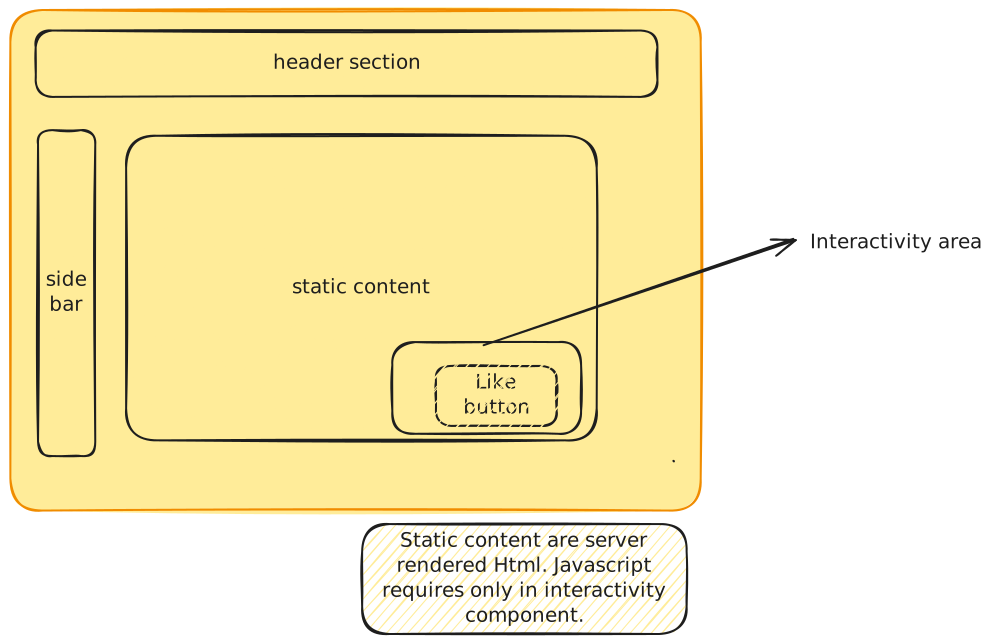
This approach fundamentally changes how we think about page composition:
- Server-Side Rendering: The majority of the page is rendered as static HTML on the server.
- Selective Hydration: Only specific, interactive components (islands) receive JavaScript and undergo hydration.
- Independent Islands: Each interactive component operates independently, with its own JavaScript bundle and hydration process.
- Progressive Enhancement: The page remains functional even before JavaScript loads, with enhanced functionality appearing as islands are hydrated.
Benefits of Islands Architecture
Implementing islands architecture offers several significant advantages:
- Reduced JavaScript Payload: By sending JavaScript only for interactive components, overall bundle size decreases dramatically.
- Faster Initial Load: Static HTML renders quickly, providing immediate content to users.
- Prioritized Interactivity: Critical interactive elements can be hydrated first, improving perceived performance.
- Improved Core Web Vitals: Smaller JavaScript bundles and selective hydration contribute to better Largest Contentful Paint (LCP), First Input Delay (FID), and Cumulative Layout Shift (CLS) scores.
- Enhanced Developer Experience: Clearer separation of concerns between static and interactive components.
Frameworks Supporting Islands Architecture
Several modern frameworks have embraced the islands architecture concept:
Astro
Built around the islands concept from the ground up, allowing “partial hydration” with support for React, Vue, Svelte, and other UI frameworks. Astro’s innovative “use:client” directive lets developers precisely control which components receive JavaScript.
Marko
Developed by eBay, Marko automatically optimizes rendering and hydration of components. Its progressive rendering approach streams HTML to the browser while intelligently managing component hydration.
Fresh
A Deno-based framework using islands architecture with Preact components. Fresh delivers zero JavaScript by default and only sends JS for interactive islands, resulting in exceptionally fast page loads.
Eleventy + Islands
Combining the popular static site generator with islands architecture through plugins like Eleventy-Serverless and WebC. This approach brings interactive islands to Eleventy’s already powerful static site generation.
Building a Custom Functional Island
Let’s explore how to implement a basic islands architecture pattern by creating a custom interactive component within a primarily static page.
Implementation Strategy
Our implementation will follow these key principles:
- Render the majority of content as static HTML
- Create self-contained interactive components
- Implement selective hydration
- Ensure progressive enhancement
Creating the Island Component
First, let’s create a simple interactive counter component that will function as our island:
export class CounterIsland extends HTMLElement {  constructor() {    super();    this.count = 0;    this.render();  }
  connectedCallback() {    this.querySelector('button').addEventListener('click', () => {      this.count++;      this.render();    });  }
  render() {    this.innerHTML = `      <div class="counter-island">        <h3>Interactive Counter Island</h3>        <p>Count: <span>${this.count}</span></p>        <button>Increment</button>      </div>    `;  }}
// Register the custom element if we're in the browserif (typeof window !== 'undefined') {  customElements.define('counter-island', CounterIsland);}
Hydration Process
The key to islands architecture is selective hydration. Here’s how we can implement a simple hydration system:
export function hydrateIslands() {  // Find all islands that need hydration  const islands = document.querySelectorAll('[data-island]');
  // Process each island  islands.forEach(island => {    const islandType = island.dataset.island;
    // Dynamically import only the JavaScript needed for this island    import(`./islands/${islandType}.js`)      .then(module => {        console.log(`Island ${islandType} hydrated successfully`);      })      .catch(error => {        console.error(`Failed to hydrate island ${islandType}:`, error);      });  });}
// Execute hydration when DOM is readyif (typeof window !== 'undefined') {  if (document.readyState === 'loading') {    document.addEventListener('DOMContentLoaded', hydrateIslands);  } else {    hydrateIslands();  }}
Now, we can use this in our HTML:
<!DOCTYPE html><html lang="en"><head>  <meta charset="UTF-8">  <meta name="viewport" content="width=device-width, initial-scale=1.0">  <title>Islands Architecture Demo</title>  <link rel="stylesheet" href="styles.css">  <script type="module" src="island-hydrator.js"></script></head><body>  <header>    <h1>Islands Architecture Demonstration</h1>    <p>This page contains mostly static content with interactive islands.</p>  </header>
  <main>    <section class="content">      <h2>Static Content Section</h2>      <p>This content is completely static and requires no JavaScript.</p>      <p>It loads instantly and provides immediate value to the user.</p>    </section>
    <!-- This is our interactive island -->    <counter-island data-island="counter"></counter-island>
    <section class="content">      <h2>More Static Content</h2>      <p>Another section of static content that requires no JavaScript.</p>    </section>
    <!-- Another potential island could go here -->  </main>
  <footer>    <p>© 2025 Islands Architecture Demo</p>  </footer></body></html>
Real-World Use Cases
Islands architecture shines in several common scenarios:
- Content-heavy websites with occasional interactive elements (blogs, documentation sites)
- E-commerce product pages where most content is static but product selectors and carts need interactivity
- News and media sites with embedded interactive data visualizations or comments
- Documentation sites with interactive code playgrounds
- Marketing pages with forms and interactive calculators
Complete Code Example
Here’s a more complete example of implementing islands architecture in a project:
File Structure
- index.html
- styles.css
- island-hydrator.js
Directoryislands/
- counter.js
- newsletter-signup.js
- image-carousel.js
Directorycomponents/
- header.js
- footer.js
Implementation Example
export class NewsletterSignup extends HTMLElement {  constructor() {    super();    this.render();  }
  connectedCallback() {    this.form = this.querySelector('form');    this.form.addEventListener('submit', this.handleSubmit.bind(this));  }
  handleSubmit(event) {    event.preventDefault();    const email = this.querySelector('input[type="email"]').value;
    // Form validation    if (!email || !email.includes('@')) {      this.showMessage('Please enter a valid email address', 'error');      return;    }
    // Simulate API call    this.showMessage('Submitting...', 'info');
    // In a real application, you would make an actual API call here    setTimeout(() => {      this.showMessage('Thank you for subscribing!', 'success');      this.form.reset();    }, 1500);  }
  showMessage(text, type) {    const messageEl = this.querySelector('.message');    messageEl.textContent = text;    messageEl.className = `message ${type}`;    messageEl.style.display = 'block';  }
  render() {    this.innerHTML = `      <div class="newsletter-island">        <h3>Subscribe to Our Newsletter</h3>        <form>          <input type="email" placeholder="Your email address" required />          <button type="submit">Subscribe</button>        </form>        <div class="message" style="display: none;"></div>      </div>    `;  }}
if (typeof window !== 'undefined') {  customElements.define('newsletter-signup', NewsletterSignup);}
Best Practices
To get the most out of islands architecture:
-
Identify True Interactivity Needs: Not every component needs to be interactive. Be judicious about what becomes an island.
-
Prioritize Critical Islands: Load the most important interactive elements first.
-
Consider the Fold: Defer hydration of below-the-fold islands until they’re needed.
-
Monitor Bundle Sizes: Keep individual island JavaScript bundles small and focused.
-
Plan for Communication: If islands need to communicate, implement a lightweight event system or state management solution.
-
Progressive Enhancement: Ensure the page is functional even before JavaScript loads.
-
Accessibility: Make sure interactive islands maintain proper accessibility, including keyboard navigation and screen reader support.
By implementing islands architecture, you can create web experiences that are both highly performant and richly interactive, giving users the best of both worlds. This pattern represents a significant evolution in how we approach web development, moving beyond the false dichotomy of static versus dynamic to a more nuanced, optimized approach.